
PHP2Shell: What Is the Critical PHP Vulnerability, Is Your Site Affected and What Should You Do?

On 21 October 2026, PHP released an emergency security update for two critical vulnerabilities. Tracked as CVE-2026-109618 and CVE-2026-109619, the flaws are known together as PHP2Shell, and they can allow an attacker to run code on your server without logging in. Because WordPress, WooCommerce, Joomla and Drupal sites all run on PHP, this affects almost everyone who owns a website.
In this article I explain what PHP2Shell is, how to tell whether your site is affected and, step by step, what you need to do today. At the end I also cover the SEO side: what happens to a hacked site in Google.
In short: what you need to know about PHP2Shell
- What: Two critical memory-safety vulnerabilities in the PHP core. CVSS score 9.2 (critical).
- Impact: Unauthenticated remote code execution and leaking of data such as passwords, session keys and API keys from server memory.
- Who is affected: Almost every PHP installation that serves web requests: PHP-FPM, Apache mod_php, php-cgi, FrankenPHP and LiteSpeed.
- Fix: Update PHP to a patched release: 8.5.12, 8.4.27, 8.3.36 or 8.2.35.
- Urgency: Exploitation attempts have already been seen. There is no time to wait.
What is PHP2Shell?
The vulnerabilities were found in August 2026 by the Wiz Research team, with help from AI models, and reported to the PHP security team. The patch and public disclosure followed on 21 October 2026.
The core of the problem is how PHP cleans up after fatal errors during a request, especially the “out of memory” error raised when memory runs out. Put simply:
- CVE-2026-109618: When an out-of-memory error interrupts an operation, request data can be left half-written. The cleanup steps then process this corrupted data as if it were valid, which opens a path to remote code execution.
- CVE-2026-109619: Even after the memory belonging to a request has been freed, PHP keeps pointing to it in some places. The next request handled by the same PHP worker can access this “stale” data. This is what is known as a use-after-free vulnerability.
With this chain, the researchers demonstrated both running code on the server and leaking data from the PHP worker’s memory. That memory can contain sensitive information such as database passwords, session tokens and API keys.
Why is it so serious?
Most vulnerabilities depend on a specific plugin or a specific piece of code. A few things make PHP2Shell different:
- Independent of the application: According to Wiz, exploitation does not depend on what the application does. On an affected PHP version, even a simple “Hello World” page can be vulnerable. So even if your WordPress install and plugins are fully up to date, the risk does not go away.
- One request, before your code runs: According to PHP’s advisory, one of the demonstrated exploits can be triggered before any application code runs. This is the highest risk for servers using Apache mod_php.
- A very wide scope: The researchers say almost every PHP version of the last decade is affected by at least one of the flaws.
- Attacks have started: Amazon’s honeypots recorded an exploitation attempt on 17 October, four days before public disclosure. Cloudflare reported seeing attack traffic and attempts to bypass its protections. The UK National Cyber Security Centre (NCSC) recommends considering taking systems offline temporarily if they cannot be updated right away.
Which PHP versions are safe?
These are the patched releases published by PHP:
| PHP branch | Patched release |
|---|---|
| PHP 8.5 | 8.5.12 and later |
| PHP 8.4 | 8.4.27 and later |
| PHP 8.3 | 8.3.36 and later |
| PHP 8.2 | 8.2.35 and later |
| PHP 8.1, 8.0, 7.4 and earlier | No official support |
PHP 8.1 and older are no longer supported by the PHP project. For 7.4, 8.0 and 8.1, only limited patches were released for people who compile PHP from source. On shared hosting you cannot apply these patches yourself. So if you are on an old version, the practical fix is to move to a supported version or confirm that your host provides a patched package.
An important note: Linux distributions and some hosting panels can apply the patch without changing the old version number. In other words, the version number alone does not always give the right answer. To be sure, the safest option is to ask your host: “Does the PHP package I am using include the PHP2Shell patch?”
How to find your site’s PHP version
- In WordPress: Go to Dashboard > Tools > Site Health > Info tab > Server section and look at the “PHP version” line.
- In cPanel: On the “Select PHP Version” or “MultiPHP Manager” screen you can see which version your domain uses.
- If you manage a server: The output of
php -von the command line may not match the PHP that serves web requests. Check the PHP-FPM or LiteSpeed version used by the web server separately.
What should you do? A step-by-step checklist
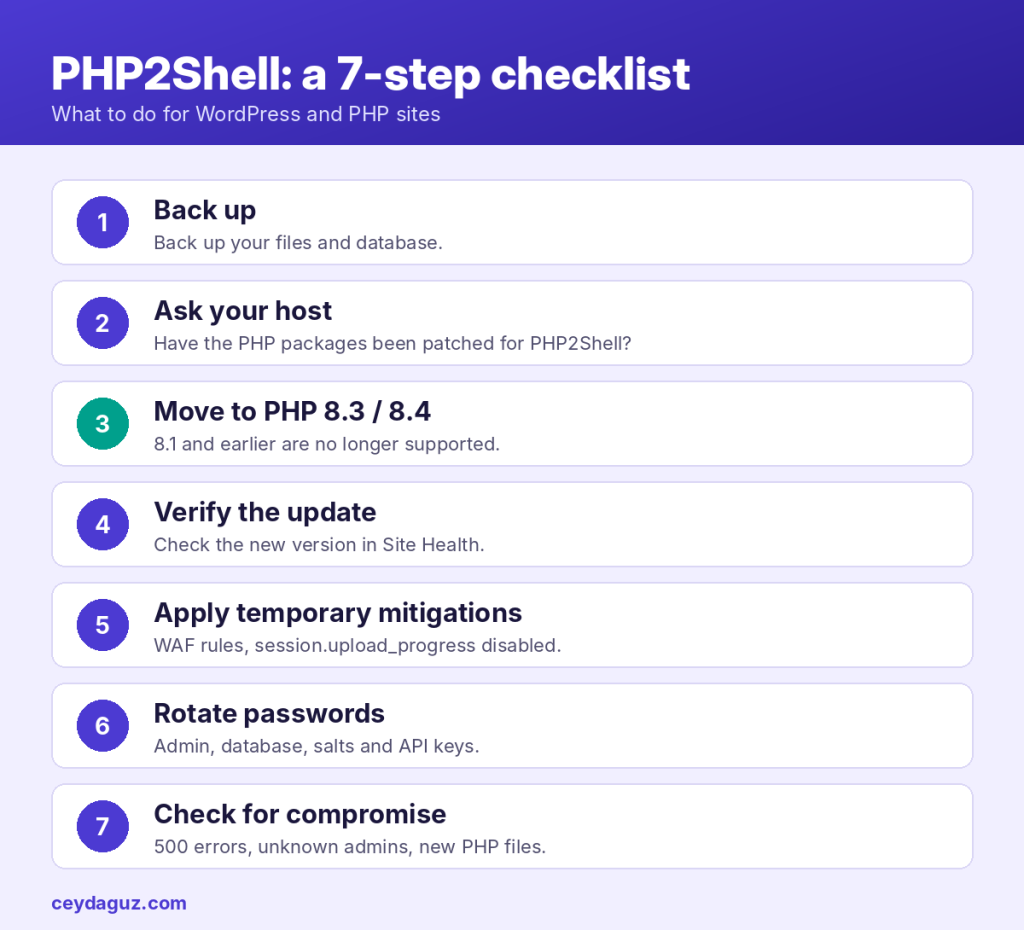
1. Back up first
Before making any change, take a fresh backup of your files and database. Changing the PHP version can break an old theme or plugin. The backup is your way back.
2. Talk to your hosting provider
On shared hosting, it is your host, not you, who updates PHP. Ask the support team: Have the PHP packages on the server been patched for PHP2Shell (CVE-2026-109618 and CVE-2026-109619)? Has any additional server-level protection been applied? Some providers, such as SiteGround, announced that they put server-level measures in place before the disclosure.
3. Move to a supported PHP version
If your site runs PHP 8.1 or older, plan a move to PHP 8.3 or 8.4. If possible, test it on a staging copy first. Check that your theme and plugins are compatible with the new version, that the front end and the admin panel load without problems and that your forms work. Plugins that cause problems can usually be fixed by updating them or replacing them with an alternative.
4. Verify that the update is actually active
After PHP is updated, the running PHP processes need to be restarted. Confirm on the Site Health screen that the version has changed. If you manage your own server, restart the PHP-FPM or web server service.
5. If you cannot update right away, apply temporary mitigations
These measures reduce the risk but are not a complete fix. The only complete fix is the update.
- If you use Cloudflare: Cloudflare has enabled WAF rules for the known attack methods for all customers, including the free plan.
- Disable session upload progress: Apply
session.upload_progress.enabled = 0via php.ini, the FPM pool or the server configuration. According to PHP’s warning, this setting has no effect if made withini_set()or.user.ini. Then restart the PHP processes. - Limit request sizes: Lower
post_max_sizeto what you need (for example 8M if you have no file uploads, 32M if you do) and keepupload_max_filesizebelow it. - If you cannot change these settings yourself on shared hosting, ask your host to do it.
6. Rotate your passwords and keys
Because one of the flaws allows data in server memory to leak, it is wise to rotate sensitive credentials after updating:
- WordPress administrator passwords
- The database password (together with wp-config.php)
- The security keys (salts) in wp-config.php. When you change them, all users are logged out; this is normal.
- API keys for services such as payment gateways, SMTP and shipping integrations
7. Check for signs of compromise
Possible indicators shared by the researchers:
- Memory limit errors in server logs following unusual multipart requests
- Repeated HTTP 500 errors
- Abnormally large or malformed
PHPSESSIDcookies - Unexplained PHP worker restarts
On the WordPress side, also look for administrator users you do not recognise, new PHP files of unknown origin in the wp-content folder, unexpected redirects or pages on your site that you did not add. If you see anything suspicious, have the site reviewed by a security specialist or your host’s security team.
The SEO side: what happens to a hacked site in Google?
A security vulnerability is not only a technical problem. Compromised sites often pay a heavy price in SEO too:
- Spam content injection: Attackers can add thousands of spam pages to your site. These pages get indexed, and your site’s authority and trustworthiness suffer.
- Hidden redirects: Your visitors, especially those coming from Google, can be redirected to malicious sites.
- Warnings in search results: If Google flags your site as dangerous, a “This site may be hacked” warning can appear in search results and browsers can warn visitors. Click-through rates drop sharply.
- Loss of rankings: Cleanup and Google’s re-evaluation take time. Organic traffic can be lost during this period.
That is why you should regularly check the Security & Manual Actions > Security issues report in Google Search Console. If an issue is reported, you can request a review from the same screen after cleaning up the site. Also make sure Search Console email notifications are turned on.
Conclusion
PHP2Shell is one of the most far-reaching PHP vulnerabilities in recent years. The good news is that the fix is clear: update PHP to a patched release. If your site is on an old PHP version, this is also a good opportunity to make the PHP 8.x move you have been putting off. Newer PHP versions usually bring better performance as well as security, and speed is one of the important signals for SEO.
If you are not sure which version your site is on, or you need support during the migration, feel free to get in touch with me.
Sources
- Qualys: PHP2Shell, PHP Patches Two Critical RCE Vulnerabilities
- Wiz Research: PHP2Shell
- Help Net Security: PHP2Shell vulnerabilities patched
- CISA: Critical Vulnerabilities in PHP Require Immediate Patching
- SiteGround: Critical PHP vulnerabilities


